Reverse Engineering the Netware 386 Filesystem
I decided to take a look into the NetWare 386 filesystem, which was used in NetWare 3.x and 4.x and perhaps later versions as well. This post serves to give a high-level background on the design and layout. Tools to analyze and extract content from such a filesystem can be found at https://github.com/zhmu/nwfs386
If you have any corrections, additional information or questions, please reach out to me by email at rink@rink.nu. I’ll try to update this post as necessary. I also accept pull requests on Github!
Overview
Even though NWFS386 was introduced in the late 80-ies, it is more than a filesystem: it performs bad sector remapping, mirroring and divides the partition into volumes, which can span multiple partitions. This is indeed no ordinary filesystem. A brief overview:
- A physical disk can have a single NetWare partition
- A NetWare partition can be mirrored (similar to RAID-1) and performs its own bad sector remapping (redirection)
- A NetWare volume contains files/directories and is allocated to one or more partitions
Hence, a volume can span multiple partitions, which may can be mirrored as desired for added reliability. This is indeed much more than just a filesystem!
In-depth feature list
- NWFS386 uses 32-bit block numbers and 32-bit file/directory identifiers
- Important NWFS386 partition structures are stored 4 times
- A volume has its own block size, which can be 4KB, 8KB, 16KB, 32KB or 64KB in size.
- Volumes can span multiple partitions, and volumes may be extended at any time
- All meta-data is read in memory when mounting
- Volume meta-data (FAT chain, directory contents) are stored twice
- File data is stored a single time
Layout
NetWare 386 uses the MBR to locate partitions. There can be a single partition per device, and this partition must have an ID of 0x65.
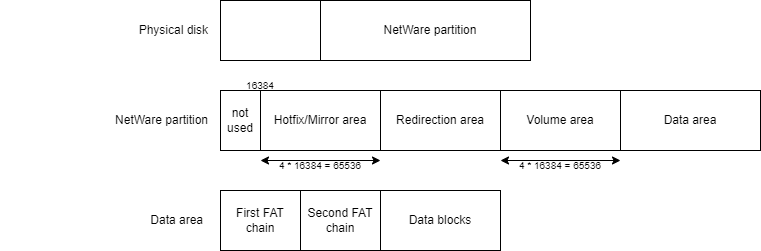
- The first 16KB of the NetWare partition is not in use
- The next 16KB contains the hotfix/mirror area. These detail the number of redirection sectors and data sectors available, and how many sectors are allocated to remap bad sectors (the redirection area). This information is replicated 4 times.
- The redirection area hasn’t been thoroughly explored; the idea is that bad sectors are remapped here by the NetWare OS.
- The volume area contains which volumes are stored on this partition. There can be multiple volumes stored on a single partition, and each volume can span multiple partitions. This area contains 16KB of data which is replicated 4 times.
- Finally, the data area stores the FAT chain and data blocks for the files/directories on the volume.
We’ll go in depth on these areas in the next sections.
Hotfix header
Being the first structure in the partition, it describes how many sectors of the partition are allocated for block data as well as redirection purposes.
| Field | Type | Description |
|---|---|---|
| id | byte[8] | Identification string (HOTFIX00) |
| v_id | u32 | Identification code |
| ? | u16[4] | ? |
| data_area_sectors | u32 | Number of sectors for data |
| redir_area_sectors | u32 | Number of sectors for redirection |
| ? | u32[8] | ? |
Our main field of interest is redir_area_sectors which contains the number of sectors used for the hotfix/mirror area and the redirection area. In other words, it allows to calculate where the volume area starts within the partition.
The next sector contains the mirror header as illustrated below.
Mirror header
The second structure in the partition, this describes whether the partition is mirrored – and if so, with with other partitions.
| Field | Type | Description |
|---|---|---|
| id | byte[8] | Identification string (MIRROR00) |
| create_time | u32 | Creation timestamp |
| ? | u32[5] | ? |
| v_id1 | u32 | Hotfix area ID #1 |
| v_id2 | u32 | Hotfix area ID #2 |
v_idN contain the hotfix header v_id values of all partitions that appear within the mirror. Hence, the v_id of the partition’s hotfix header should always be appear in any of the v_idN fields.
Note: there are likely be more than 2 area ID’s allowed, but I haven’t looked into this due to my inability to add SCSI disks to my qemu instance (the dc390 driver seems the only supported one in NetWare 3.x and I can’t get it to work) as I ran out of IDE devices. Any help would be appreciated.
Volume area
The volume area is located directly past the redirection area; the offset is 16384 + redir_area_sectors * 512 bytes within the partition.
| Field | Type | Description |
|---|---|---|
| magic | byte[16] | “NetWare Volumes” + \0 |
| num_volumes | u32 | Number of volume entries |
| ? | u32[3] | ? |
This header is followed by num_volumes times a volume header, which is detailed below. Regardless of the number of volumes, 16KB will be used to store the volume information. Furthermore, the volume information is replicated 4 times, which means 64KB is used for the volume area.
Volume entry
| Field | Type | Description |
|---|---|---|
| name_length | u8 | Volume name length, in bytes |
| name | byte[19] | Volume name |
| ? | u16 | ? |
| segment_num | u16 | Volume segment number |
| first_sector | u32 | Always 160 (?) |
| num_sectors | u32 | Number of sectors in this segment |
| total_blocks | u32 | Total number of blocks in this volume |
| first_segment_block | u32 | First data block this segment contains |
| ? | u32 | ? |
| block_value | u32 | Used to calculate the block size |
| rootdir_block_nr | u32 | Block number containing the directory |
| rootdir_copy_block_nr | u32 | Block number containing the directory copy |
| ? | u32 | ? |
The volume’s block size is (256 / block_value) * 1024. The smallest block size is 1KB, whereas the largest would be 256KB. The installer does not allow you to create such large blocks, and I haven’t tried if they work at all.
If your volume spans multiple partitions, all partitions will have the volume listed in their volume area. However, the first segment will have first_segment_block = 0, whereas the second segment contains a non-zero value. Thus, all blocks within the segment are relative to first_segment_block, and given a block number you must determine which partition must be accessed.
FAT
The NetWare 386 filesystem was clearly inspired by the FAT file system, as it also uses a singly linked list to be able to find the next block of each file. Like FAT, this linked list is stored twice. As the entire FAT is read into memory at mount time and updated on disk as necessary, this is quite speedy.
The root directory is not fixed-length or fixed-size: the rootdir_block_nr and rootdir_copy_block_nr fields of the volume determine where the initial block of the root directory is – the FAT chain can then be used to determine the subsequent blocks as needed. This is similar to the approach taken in FAT32, except for the extra copy.
An important difference is that the root directory is the only directory stored in NWFS386. Every directory entry contains the ID of the directory in which the entry resides. There are a few magic values with their own respective entry content, such as volume information and additional trustee lists. The root directory uses ID 0.
Every FAT entry is completely incompatible with DOS FAT. Every entry is 128 bytes, which ensures it will never span across multiple sectors.
File entry
| Field | Type | Description |
|---|---|---|
| parent_dir_id | u32 | Directory ID where the item resides |
| attr | u32 | Entry attributes (must not have directory bit set) |
| ? | byte[3] | ? |
| name_len | byte | File name length, in bytes |
| name | byte[12] | 8.3 file name |
| create_time | u32 | File creation time |
| owner_id | bu32 | Object ID of the current file owner |
| ? | u32[2] | ? |
| modify_time | u32 | File last modification time |
| modifier_id | bu32 | Object ID of the last file modifier |
| length | u32 | File length, in bytes |
| block_nr | u32 | First file block number |
| ? | u32 | ? |
| trustees | Trustee[6] | Trustees |
| ? | u32[2] | ? |
| delete_time | u32 | When was file deleted, zero if not deleted |
| delete_id | bu32 | Object ID of who deleted the file |
| ? | u32[2] | ? |
| file_entry | u32 | Unknown |
| ? | u32 | ? |
Directory entry
| Field | Type | Description |
|---|---|---|
| parent_dir_id | u32 | Directory ID where the item resides |
| attr | u32 | Entry attributes (must have directory bit set) |
| ? | u8[3] | ? |
| name_len | u8 | File name length, in bytes |
| name | u8[12] | 8.3 file name |
| create_time | u32 | Directory creation time |
| owner_id | bu32 | Directory owner object ID |
| ? | u32[2] | ? |
| modify_time | u32 | Directory last modification time |
| ? | u32 | ? |
| trustees | Trustee[8] | Trustees |
| ? | u16[2] | ? |
| inherited_rights_mask | u16 | Mask for inherited rights |
| subdir_index | u32 | Unknown |
| ? | u16[7] | ? |
| directory_id | u32 | ID of this directory |
| ? | u16[2] | ? |
Available entry
Available entries contain a parent_dir_id of 0xffff ffff. The other 124 bytes tend to be zeros.
Grant list
Whenever more trustees are added to a file/directory which cannot be stored in the corresponding FAT entry itself, a grant list will be added to the volume with the responding information. This hasn’t been decoded in too much detail.
| Field | Type | Description |
|---|---|---|
| parent_dir_id | u32 | 0xffff fffe |
| ? | u32[5] | ? |
| trustees | Trustee[16] | Trustees |
| ? | u32[2] | ? |
| Volume information | ||
| Field | Type | Description |
| parent_dir_id | u32 | 0xffff fffd |
| ? | u32[5] | ? |
| create_time | u32 | Volume creation time |
| owner_id | u32 | Object ID of volume owner |
| ? | u32[2] | ? |
| modify_time | u32 | Last modification time |
| ? | u32 | ? |
| trustees | Trustee[8] | Trustees |
| ? | u32[8] | ? |
| Trustee structure | ||
| Field | Type | Description |
| object_id | bu32 | Object ID where the trustee applies to |
| rights | u16 | Bitmask containing trustee rights |
The rights mask contains the following bits:
| Bit | NetWare right | Description |
|---|---|---|
| 0 | R | Read access |
| 1 | W | Write acces |
| 2 | Seems to be used internally? | |
| 3 | C | Access to create subentries |
| 4 | E | Erase subentries |
| 5 | A | Access control |
| 6 | F | File scan |
| 7 | M | Modify attributes |
| 8 | S | Supervisory (overrides all others) |
Attribute bits
| Bit | FILER flag | Description |
|---|---|---|
| 0 | Ro (Rw if clear) | Read-only |
| 1 | H | Hidden |
| 2 | Sy | System |
| 4 | Directory | |
| 5 | A | Archive |
| 7 | S | Shareable |
| 12 | T | Transactional |
| 16 | P | Purge |
| 17 | Ri | Rename Inhibit |
| 18 | Di | Delete Inhibit |
| 19 | Ci | Copy Inhibit |
Timestamp
A timestamp is a 32-bit value, which is to be interpreted as two 16-bit values: the high part is the date and the low part is the time.
| Piece | Bits | Description |
|---|---|---|
| Time | 11:15 | Hour |
| 5:10 | Minute | |
| 0:4 | Second divided by 2 | |
| Date | 9:15 | Year minus 1980 |
| 5:8 | Month | |
| 0:4 | Day |